In this edition of Washington State University’s (WSU) Zoom newsletter, Information Technology Services (ITS) is excited to share the latest updates on new and existing Zoom services that can improve how our community connects, collaborates, and communicates in unique ways.
Zoom Phone
Transforming Telecommunications Across WSU
Following in the footsteps of leading higher education institutions such as Arizona State University and Gonzaga University, WSU is revolutionizing telecommunications with the introduction of Zoom Phone.
Now fully adopted by WSU Everett and WSU Vancouver, Zoom Phone seamlessly integrates phone call and video meeting capabilities into the familiar Zoom platform. This unified communication solution allows you to switch between phone calls and video meetings, share content, and participate in video meetings all from the Zoom desktop and mobile apps.
Building on the successful implementation of Zoom Phone at the Everett and Vancouver campuses, WSU is excited to continue improving telecommunications technology across the system. The deployment of Zoom Phone is already underway at WSU Spokane, and now, WSU is preparing to introduce this solution technology to its largest campus: WSU Pullman.
As the university prepares for a complete rollout of Zoom Phone, WSU will set a new telecommunications standard rooted in efficiency.
Zoom Phone offers advanced features that provide a comprehensive communication solution for diverse university needs:
- Accessible via Apps: Manage meetings, phone calls, and team chat through the Zoom app for Windows, Mac, iOS, and Android devices
- Text Messaging: Send and receive SMS (text messages) using Zoom
- Voicemail: Manage voice messages from any device with voicemail transcription and notification
- Call Transfer: Route calls to the right person anytime, anywhere with supervised and blind transfer capabilities
- Call Forwarding: Redirect calls to internal users and external phone numbers by creating and managing personalized call handling rules
- Call Delegation: Allow individuals to make and receive calls on behalf of supervisors and unit leaders
- Call Recording: Archive and retrieve phone conversations with on-demand recording, transcriptions, and playback
- Call Blocking: Automatically block unwanted calls with personalized call blacklists
- Call Hold: Place calls on hold and retrieve on-hold calls
Zoom Phone offers a flexible, mobile, and powerful cloud phone system.
Convenience and Flexibility: Zoom Phone is hybrid and remote-work-friendly. By eliminating the need for physical desk phones or hardware, Zoom Phone allows you to manage interactions on any device in which you can download the Zoom app.
Sustainability and Cost Efficiency: By reducing reliance on physical desk phones, Zoom Phone is an eco-friendly and cost-effective system that improves sustainability and minimizes hardware maintenance costs.
Integration: Zoom Phone easily integrates with the WSU phone number system, allowing you to keep your current 10-digit number and 5-digit extension. You can also make calls by typing a name into Zoom.
Zoom Contact Center
A New Approach to Customer Service
Zoom Contact Center is a powerful, cloud-based solution that brings together video, voice, chat, and SMS in one seamless, integrated experience within Zoom.
This omnichannel contact center solution is designed to help university areas manage inbound and outbound communication, access support data, and resolve customer issues as efficiently as possible. Built with flexibility and scalability in mind, it can also grow and evolve alongside your service needs.
With minimal training required and strong performance across digital channels, Zoom Contact Center can empower WSU support teams to provide high-quality, reliable support from day one.
At WSU Pullman, the Crimson Service Desk—one of the university’s primary technical support teams—is already seeing strong results with Zoom Contact Center. In just a few short months, the team has used the contact center solution to streamline and elevate how they manage thousands of support requests from across the university community using the contact center’s integrated video and voice capabilities.
Their success demonstrates how Zoom Contact Center can empower support teams to connect and serve the WSU community in a new and improved way.
Zoom Contact Center offers numerous features that can help support teams at WSU create a standard for customer service:
- Omnichannel Support: Handle customer interactions seamlessly across various channels, providing a consistent and efficient customer experience.
- Video Optimization: Leverage Zoom’s video capabilities to enhance customer engagements.
- Advanced Routing: Utilize intelligent routing techniques to direct customer inquiries to the most appropriate agents.
- Analytics: Measure productivity, call performance, quality management, and self-service metrics with real-time and historical data through comprehensive analytics and reporting tools.
- Ease of Setup: Provision phone numbers and program a contact center flow in minutes with drag-and-drop modules that provide automatic speech recognition, recordings, and text-to-speech.
Enhanced Customer Experience: With video and multiple communication channels, support teams can offer more engaging customer interactions and maintain the human element in the customer experience.
Increased Collaboration: This unified platform encourages collaboration among team members for improved problem-solving and service delivery.
Scalability: Easily select new services, add additional agent licenses, increase security features, test new tools, and integrate the contact center into other applications for improved workflows.
Flexibility: Support teams can access the same features and customer data regardless of location.
Cost Efficiency: Consolidating communication tools into a single platform can reduce the complexity and costs associated with managing multiple systems. No longer rely on expensive, on-premises hardware that is difficult to maintain and upgrade. Since this is built in the cloud, it is continuously being enhanced with new features, fixes, and functionality. This also allows you to pay only for the services you need.
Accessibility: Use this platform on mobile devices, desktops, laptops, desk phones, and softphones with only an internet connection required.
Zoom AI Companion Panel
Easy-to-Access AI Assistant
Zoom’s new AI Companion panel is a new tool that offers a wide range of smart assistant functionalities that can support daily tasks.
The AI Companion panel accesses and utilizes Zoom data, including meeting summaries, Team Chat messages, and Zoom Docs, to transform your workflow in the following ways:
- Meeting Summaries: Receive concise summaries of your meetings to save time and focus on the most critical information.
- Message Retrieval: Find specific Team Chat messages quickly for more effortless follow-up.
- Document Assistance: Receive help with document-related tasks within Zoom Docs.
By reviewing available Zoom data, the AI Companion panel works to provide tailored, comprehensive responses to help answer your questions. This powerful tool makes managing your responsibilities simpler and more organized for more efficient workdays.
Enable the AI Companion panel via the WSU Zoom web portal to securely use and explore new AI capabilities:
- Sign in to the WSU Zoom web portal with your WSU credentials.
- Select Settings tab on the left navigation menu.
- Find and select the AI Companion tab.
- Enable the toggle button for the AI Companion panel in Zoom Workplace option.
Once enabled, you can access the AI Companion panel via an AI sparkle icon within the Zoom app:
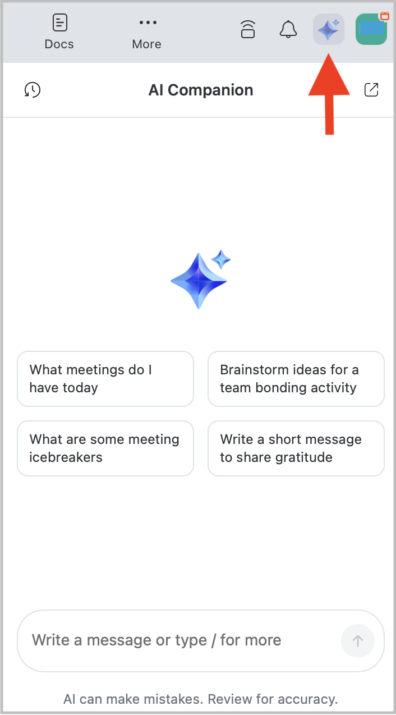
By default, AI Companion will use available Zoom data sources such as meeting transcripts, Zoom Team Chat messages, and similar Zoom-hosted information. However, additional third-party data sources including calendar events, emails, and documents, can also be used as sources for AI Companion.
To enable third-party data sources for AI Companion, please email WSU’s Zoom Services team at zoom.support@wsu.edu.
Zoom AI Companion at WSU currently supports the use of specific data from the following third-party sources:
- Microsoft 365
- Public web content from Perplexity
- Local file uploads
Zoom’s AI Companion panel generates responses based on content from various sources, including user inputs, Zoom meeting content, connected third-party data sources, web content, and locally uploaded files.
Access to these data sources is governed by user settings and permissions, which are managed either by individual users or university Zoom administrators.
AI Companion only references and indexes content from your Zoom account and any additional data sources that have been explicitly enabled. For third-party data sources, Zoom only indexes and stores content that has been viewed or edited within the past 30 days.
Zoom Surveys
Gather and Analyze Data Efficiently
With an intuitive, user-friendly interface, Zoom Surveys allows you to create and manage a library of interactive surveys, polls, and quizzes for use in any meeting or webinar.
Ensuring quick and simplified accessibility, Zoom Surveys provides all survey, poll, and quiz tools and comprehensive results data in one centralized location on the Zoom platform. Zoom Surveys also allows you to share your surveys, polls, and quizzes with participants via links or generated QR codes, making it easy for everyone to access and respond.
With its expansive capabilities, Zoom Surveys is a powerful tool for collecting audience insights while fostering engagement.
Zoom Apps
Provide a Dynamic Meeting Experience
Create unique, dynamic meeting experiences that help improve engagement, productivity, organization, and more with any of WSU’s pre-approved Zoom Apps that allow you to integrate third-party services and tools directly into your meetings.
Zoom Apps vary widely with the types of tools and support they can offer. A few approved apps are listed below for your review:
- Powered by AI
- Productivity
- Engagement
Cloud Recording for Students
Expanding Access to Flexible Recording Tools
All enrolled students now have access to Zoom cloud recording, allowing recorded meeting content to be stored directly in their university Zoom account for up to 30 days.
Students are encouraged to learn more about Zoom cloud recordings and find new ways to incorporate this new service offering into their academic experiences at WSU.
Improved Connection: Meet with peers virtually around your busy schedules, or connect with other groups on campus, with confidence that information will be recorded securely.
Enhanced Accessibility: Automated transcripts and captioning make content more accessible.
Flexible Viewing Options: Stream recordings from any device, including computers, tablets, or smartphones.
Easy Sharing: Share recordings with peers or instructors using cloud-based links.
Organized Content: Zoom’s cloud recording management features allow recordings to be organized and searched by date, topic, or keywords.
Secure Storage: Recordings are safely stored in the cloud, reducing the risk of data loss due to hardware issues. You will also save device space as large video files related to your meetings will be stored via the cloud in Zoom.
Group Projects: Collaborate seamlessly on group projects by sharing recordings, ensuring everyone stays on the same page.
Study Groups: Benefit from recorded study sessions, allowing members to revisit important points and prepare more effectively for exams.
Extracurricular Activities: Keep track of decisions and action items in club meetings or other academic events.
- Label and categorize recordings by date, topic, or course to easily find and review them later.
- Trim recordings to highlight key segments, making it easier for viewers to focus on important parts of the meeting.
- Customize sharing permissions with link expiration dates, passcodes, and controlled download options to ensure recordings are shared securely.
- Quickly search transcripts for specific information within recordings using key words.
- Regularly review recorded meetings to see if recorded content can be deleted or retained.
New Zoom Support Request Form
Expanding Support Options
WSU’s Zoom Service team is excited to introduce a new and improved way to receive support. Powered by one of the university’s top support ticketing services, Jira, the new WSU Zoom request portal is designed to make submitting and tracking support requests easier.
This new portal offers an enhanced service experience tailored to everyday users for any WSU Zoom questions or concerns. Faculty, staff, and students can access the new WSU Zoom request portal by signing in with their university credentials.
The WSU Zoom request portal is a one-stop solution for all your Zoom-related needs. Whether you are looking to submit requests, track progress, or explore self-service articles, this new portal ensures you can reach the support team quickly or find self-service solutions at all hours for faster resolution.
Self-Service Capabilities: Find solutions to your questions anywhere, anytime, with direct access to Zoom self-service support articles via this new portal.
Improved Visibility and Transparency: Easily track the status of your submitted support requests, identify the assigned team member for your requests, and access all recent request updates via the portal.
Simplified Use: Create a support request using the improved fields to ensure all necessary information is included in your requests.
Friendly Reminders
Quarterly Zoom Version Updates
Mandatory Zoom updates are scheduled every quarter, with the next version update expected in June 2025.
Meeting Security Requirements
WSU requires all Zoom meetings to be secured with a passcode, waiting room, or required authentication to join the meeting.
Zoom Cloud Recording Retention
Meeting recordings are retained in the Zoom web portal for 365 days for WSU staff and 425 days for Video Conference (VC) instructors.
Meeting ID and Link Expiration
Expiration rules for different Zoom meeting types may cause an invalid meeting ID error to appear and may prevent you from starting your meetings on time.
Free Webinar and Event Licensing
WSU offers Zoom Webinar and Zoom Events licenses at no cost to faculty and staff to help you coordinate and manage sessions of all sizes and occurrences.
Free Digital Signage Tools
Create and share custom, visual multimedia displays in Zoom Rooms and other on-campus spaces via display devices using Zoom’s versatile digital signage capabilities.
Questions?
Explore the WSU Knowledge Base for additional instructional Zoom guides covering WSU Zoom account access, meeting controls and settings, privacy and security options, and much more.
Please direct questions to WSU’s Zoom Services team via email at zoom.support@wsu.edu or online.
Meet the Team

Travis Williams
Manager, UC Infrastructure and Support
Given my role at WSU, I cultivate a team with expertise and leadership in Unified Communications delivery and management. My team represents WSU’s distance education and collaborative communication interests. We strive to conduct outstanding support for the WSU community, providing tools and transparent reporting to technical teams across the institution. My goal is for stakeholders who engage my team to have a positive outcome, and also to feel confident the service they rely upon is in the best hands possible.

Brandon Henry
Unified Communications Specialist
As a Unified Communications specialist, my role is to provide technical support and training to Washington State University Zoom users. I enjoy serving WSU customers because it allows me to help create meaningful connections and facilitate seamless virtual interactions, ultimately improving the user experience and achieving the goal of enhancing collaboration and communication within the WSU community.

Casey O’Leary
Unified Communications Specialist
As a graduate of WSU myself, I have always enjoyed my experience within the WSU community. Previously, this was as a student and sports fan, but now I’m able to contribute in a professional manner by providing technical support, training, and administration of Unified Communications services across WSU. My goal is to provide the highest level of service within my capacity in ITS, so that we can continue to grow and progress the overall WSU community.