Check out common holiday-related cyber threats and incorporate new strategies into your online routine to help you protect your personal and financial data.
Report Suspicious Online Activity
In your work environment, always report suspicious online or email activity to WSU’s Information Security team at abuse@wsu.edu and avoid engaging with the content until the safety and authenticity of the source is verified.
Safety Tips
Follow the recommendations below as you browse, shop, and connect online for more secure digital interactions and transactions.
1. Protect your sensitive information. Avoid sharing personal or financial details with an untrusted source through email, text, or phone. Keep your sensitive information private to prevent potential fraud and protect your accounts from unauthorized access.
2. Avoid interacting with unsolicited links or attachments. Be cautious when opening links or file attachments received via email or text as malicious messages are often disguised to appear legitimate. Verify the legitimacy of links and attachments before accessing them.
3. Be cautious of offers that are too good to be true. Online offers that seem too good to be true usually are. Verify suspicious discounts or sales by visiting a business’ direct site in a web browser instead of clicking on an external link or advertisement.
4. Conduct your research. Research new sites or online companies before making a purchase by reading reviews on product quality, customer service, and delivery times. Search the company’s name with keywords like “scam” or “fraud” to check for negative history or complaints.
5. Complete purchases with a credit card. Many credit card companies offer fraud protection services for disputing unauthorized charges and recovering funds. Use a credit card for online purchases to better protect your financial information.
6. Frequently review bank and credit card activity. Unfamiliar transactions or discrepancies in your bank and credit card activity can quickly indicate if your financial information has been compromised. Check your bank and credit card activity daily and report anything suspicious immediately.
Common Holiday Scams
Scams circulate the internet and our inboxes daily, so it is important to err on the side of caution. Cyber attackers work overtime during the holidays knowing people are eager to access exclusive offers, make purchases, track shipments, and more.
Fake Online Store Webpages
Cyber attackers create false online stores with logos, layouts, and product images that appear nearly identical to a real business site. Fake webpages work to obtain personal information, credit card details, and other sensitive data during the purchase process or infect a device or internet network with malware, increasing identity theft risks.
- Site URL contains misspellings, extra characters, or additional text
- Connection to the site is not secure
- Site URL contains HTTP instead of HTTPS
- Website text contains poor grammar, spelling, or punctuation
- Business logos or product images are resolution and pixelated
- Offers deep discounts, exclusive deals that are uncommon, or other suspicious sales
False Advertisements from Trusted Brands
Malicious advertisements presented on social media or sent via email often impersonate trusted brands and promote deep discounts to encourage recipients to interact. The malicious advertisements then redirect to a false online store that aims to steal data during the purchase process or install malware.
- Discounts are too good to be true for the company or brand
- URL, site design, or logo design contains discrepancies or odd variations
- Poor quality and low-resolution images on the advertisement or site
- Site does not offer familiar, secure payment options such as PayPal
- Advertisement or site contains poor grammar, spelling, or punctuation
Fraudulent Seasonal Job Offers
Malicious seasonal job offers offering high pay for minimal commitment spike this season as cyber attackers take advantage of individuals interested in increasing their income. The false listings use a fraudulent application or an unusually brief hiring process to steal personal and financial information.
- Job offer is unsolicited
- Pay and position expectations appear too good to be true
- Minimal to no verifiable company or business contact information
- Application process requests extensive personal details
- Job listing contains poor grammar, spelling, or punctuation
- Application is accepted, and position is offered immediately
Scam Delivery Notification Text Messages
Cyber attackers exploit the increase in online orders during the holiday season by sending fraudulent delivery notifications via text. The messages often claim an issue with the package delivery and prompt recipients to click a link for more information. This type of cyber threat directs recipients to a malicious site that may request a payment to ensure package delivery or install malware on the device used to access the link.
- Unexpected delivery notification when you did not place an online order
- Link redirects to a site that does not belong to a credible shipping company such as USPS, UPS, or FedEx
- Site requests personal or financial information to find the package or resolve the delivery
- Text contains urgent language or threats about the delivery
- Text presents with poor grammar, spelling, or punctuation
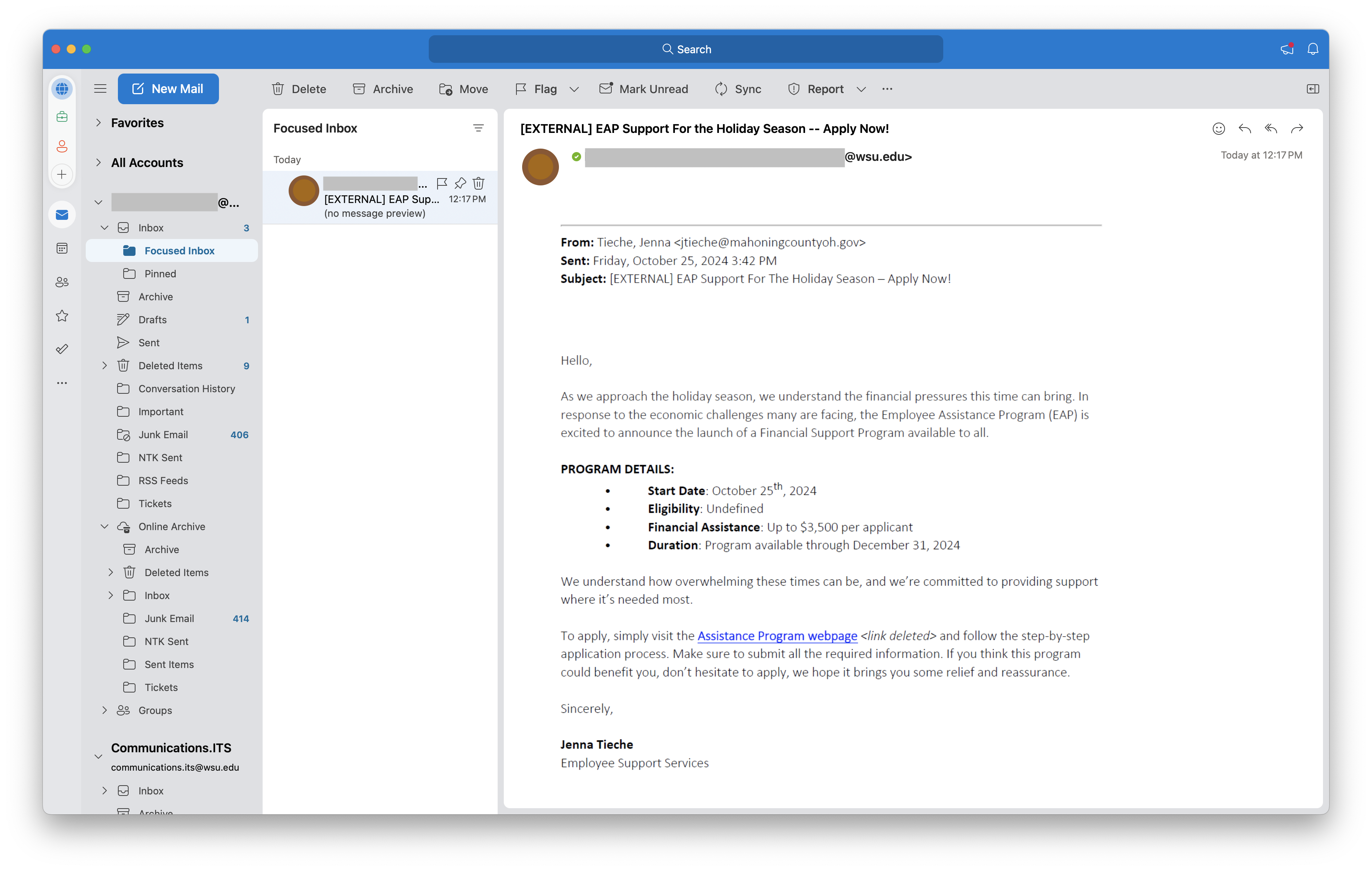
False Financial Assistance Program
Targeting university employees, emails posing as well-known local government organizations such as the Employee Assistance Program offer false financial assistance to allegedly relieve holiday season financial strains. The email then directs employees to access a malicious link to complete a fake application.
- Service being offered is outside the scope of the program
- Attempts to appeal to an emotional need of the recipient
- Offer guidelines are vague
- Suspicious sender email address
- Sender signature does not match company or organization
The phishing email may appear similar to the following example:
Additional Resources
Microsoft Outlook offers various tools for managing spam and phishing emails:
The Federal Trade Commission (FTC) provides an online resource for reporting fraud, scams, and bad business practices:
The Better Business Bureau (BBB) offers an online tool for reporting suspected scams:
The Federal Bureau of Investigation (FBI) provides additional guidance on navigating holiday scams:
Contact Us
For any questions regarding this content, please contact WSU’s Information Security team at abuse@wsu.edu or the Crimson Service Desk team at crimsonservicedesk@wsu.edu or 509-335-4357.