Pullman Zoom Phone Migration

Information Technology Services (ITS) is working to transition all WSU units from the current Cisco phone system to Zoom Phone by the end of the 2026 calendar year.

Zoom Phone replaces the Cisco phone environment by bringing phone functionality into the Zoom Workplace application, where users can make and receive calls, participate in video meetings, and share content from their computers, smartphones, tablets, and other supported devices.

Start Your Migration Planning Early

ITS is actively transitioning WSU departments from Cisco phone services to Zoom Phone, with the goal of completing all migrations before the end of the current calendar year.

Departments are encouraged to begin planning with ITS as soon as possible to allow adequate time for business process review and migration scheduling. Beginning the process early also provides time to identify and address any unexpected technical, operational, or business process considerations that may arise.

ITS will work closely with each department throughout the migration, providing the resources and support needed to ensure a successful implementation.

Physical Desk Phones

Units should evaluate their operational needs and identify any business justification for providing a physical desk phone. WSU’s standard and preferred solution is the Zoom Workplace application, which provides full softphone functionality. Physical handsets should be requested only when a documented business or operational requirement cannot be adequately met through the softphone solution.

For approved use cases requiring a physical handset, units are encouraged to select from WSU’s recommended Zoom handset options.

Each unit is responsible for determining its process for procuring handsets who have an approved business need. At this time, ITS will not purchase handsets on behalf of units.

Zoom Phone Support Resources

The following support resources provide guidance and support for WSU users as they learn to navigate Zoom Phone, utilize its features, and become familiar with the platform’s functionality:

Additional support resources are available through the WSU Knowledge Base and Zoom Support.
Questions?

WSU departments are encouraged to contact the WSU Unified Communications team with any questions or to begin migration planning.

The team will work with you to assess requirements, develop a migration plan, and support a successful transition to Zoom Phone.

In This Resource…


Project Overview

Information Technology Services (ITS) is in the process of migrating Pullman users from the prior Cisco hardware-based system (PBX), to Zoom Phone’s cloud-based Voice over IP (VoIP) offering. Zoom Phone is a unified communication solution that combines phone and video meetings. It allows users to make and receive calls, share content, and participate in video meetings from the Zoom desktop and mobile apps. The Zoom Phone offering is part of the larger unified Zoom platform already leveraged at WSU.

Key Benefits of this Transition include:

  • Flexibility – Make and receive calls from your desk phone, computer (softphone), or mobile app, anywhere with an internet connection
  • Unified Communications – One application for phone calls, video meetings, and chat
  • Modern Features – Voicemail transcription, simple call-flow management, and robust analytics are included
  • Simplified Management – IT can manage the system from a web-based portal, allowing for quick changes and updates

New Department Onboarding

To begin the process to migrate to Zoom Phone, please complete the following onboarding packet. Submission instructions are included within the onboarding PDF:

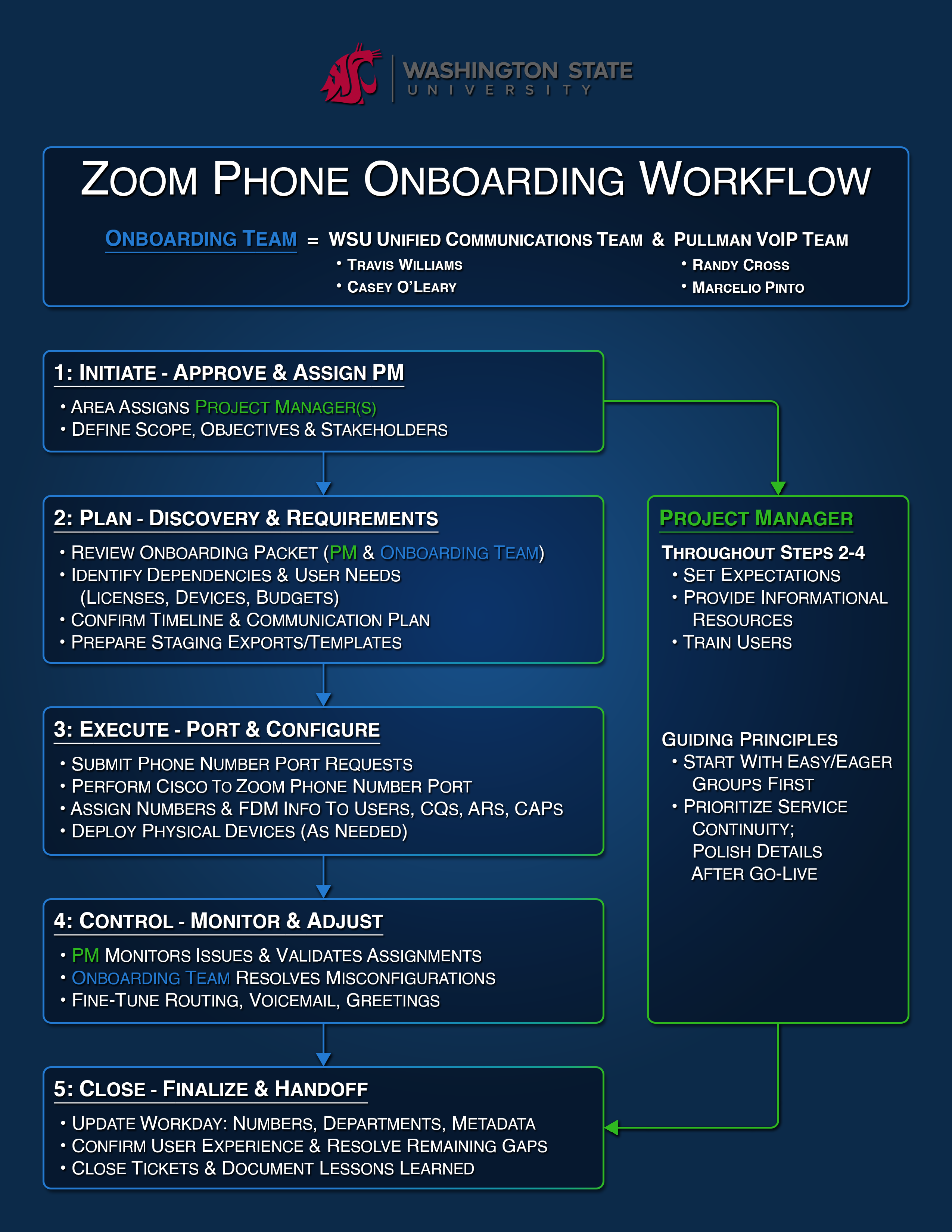
Zoom Phone Onboarding Workflow

Visual of Zoom Phone Onboarding Workflow from initiate, plan, execute, control, to close.
Select to view full image

Completed Pullman Based Zoom Phone Migrations

  • Global Campus
  • Information Technology Services
  • Student Affairs

Migrations in Progress

  • Finance and Administration – Facilities Services

Pullman Pricing Information

ITS will work with your local team to design a package to fit your needs. Usually if 25% or more of your area purchases an unlimited Zoom Phone license ($177/year), the remainder of your users receive Basic Licenses for free. If under 25% is adopted, basic users are charged individually at $8.00 annually. There are other considerations such as Analog lines and additional phones numbers ($6.00 annually) needed for phone trees that will be discussed in the design phase.

Please reach out to Travis Williams with any pricing questions.

For general Zoom inquiries, please contact zoom.support@wsu.edu or submit a ticket at the Zoom Service Desk.


General University Classroom Phone User Guide

As part of this migration, new phones were installed in WSU Pullman General University Classrooms (GUCs).

How to Get Help

In an Emergency (Police, Fire, or Medical):

  1. Lift the handset.
  2. Dial 9-1-1 or tap the Emergency 911 speed dial on the phone interface.

For Classroom Support (AV, login, or other tech issues):

  1. Lift the handset.
  2. Press the pre-programmed “PIAT Support” button, which will appear on the phone’s screen. This will automatically connect you and place the call using speakerphone.

New Equipment

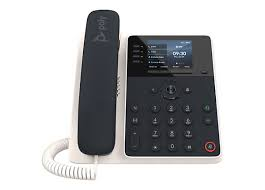
Older models are being replaced new Poly Edge E220 desk phones managed through the Zoom Phone system as part of the campus-wide technology upgrade. Images of the new Poly Edge E220 desk phones in GUCs are provided below to assist faculty impacted by this equipment upgrade.

Please Note: These phones are for classroom support and emergency use only.

Quick Tips for the Poly Edge E220 Phone

  • Handset: Lift this to make or answer a call.
  • Keypad: Use this to dial 9-1-1 manually, rather than use the speed dial.
  • Screen Keys: The buttons directly on the screen (called “soft keys”) are for specific functions, like calling the PIAT Support.
  • Mute: Press the button with the microphone crossed out to mute your microphone during a call. Press it again to unmute.
  • Speakerphone: Press the button with the speaker icon to use the speakerphone.
Stock image of a Poly E220 Desk Phone installed in the Pullman GUC classrooms
Poly E220 Desk Phone
Image displaying desk phone graphical interface with PIAT support line and WSU background
Desk phone interface with PIAT support line

Zoom Phone Optimization Project Update

The scope of the Zoom Phone Optimization project is currently being reevaluated in light of upcoming changes to the Zoom contract. Because of this, portions of the information previously published on this page are no longer accurate or may soon be outdated, particularly content related to Basic Licenses.

Our team is actively reviewing what these changes mean for the project and for future area migration planning. Updated guidance and additional details will be shared on this page as soon as they are finalized.

We appreciate your patience as we work to provide the most accurate and helpful information.