Please see the following scheduled Microsoft change:
Date: Between mid-April and mid-June 2025 *
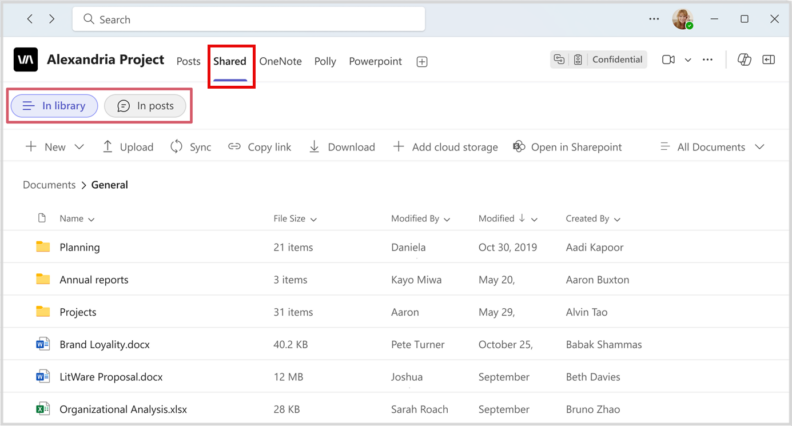
The following work is being completed: The Files tab in Microsoft Team channels will be renamed to the Shared tab. This change will allow users to view both content shared in posts and content in the document library in one place. The Shared tab will introduce two new views for accessing documents within a channel:
- In library: All existing functionality in the Files tab will be available here.
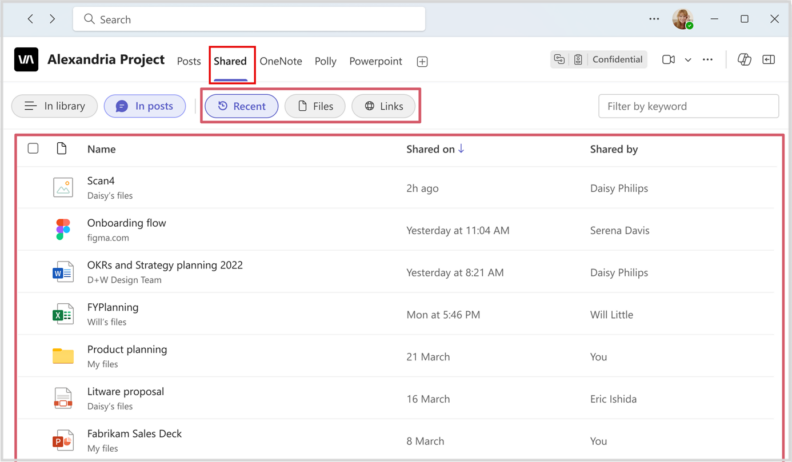
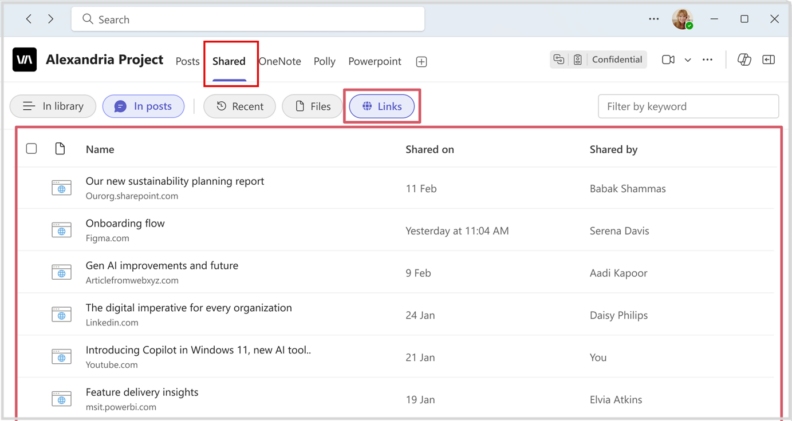
- In posts: All files and links shared in channel posts will be available here.
Visual examples:
- Preview of the new Shared tab organization:
- Users can order files by date using the Recent view and then filter by Files or Links:
- Users can use the In posts view to find links:
All affected groups: WSU Microsoft Teams users
All affected processes: The current Files tab in channels on the Teams desktop and web apps.
Duration of impact: This is a permanent, Microsoft-driven change.
Necessary follow-up steps: None
Additional information: The existing Shared tab in chats will not be affected by this change. Users can also work with files and folders in the Microsoft SharePoint document library linked to the channel.
* Exact implementation date for WSU’s Teams environment is not available at this time.
Questions? Please contact Crimson Service Desk at crimsonservicedesk@wsu.edu or 509-335-4357.