Please see the following scheduled Microsoft-driven change:
Date: January 2025 – Early February 2025
The following work is being completed: Microsoft is automatically importing the folder order from classic Microsoft Outlook for Windows to Outlook for the web. Outlook folders will continue to display alphabetically by default for users who have not customized their folder order.
All affected groups: WSU users who have enabled custom folder order in classic Outlook for Windows.
All affected processes: Custom folder orders will be preserved in Outlook for the web, with special folders such as Inbox, Drafts, Sent Items, and others remaining at the top of the folder list.
Duration of impact: This is a permanent change.
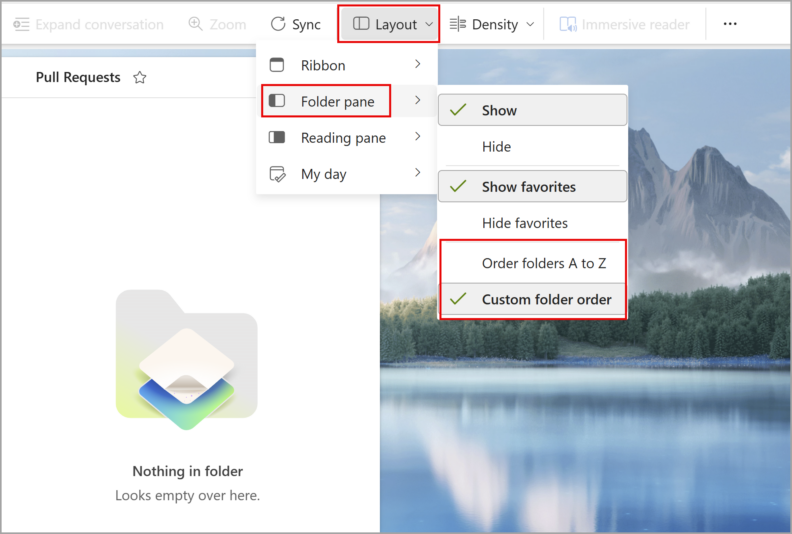
Necessary follow up steps: WSU users can change folder order by going to the new Outlook ribbon, selecting View > Layout > Folder pane, and choosing one of these options:
- Order folders A to Z order: This will organize folders alphabetically
- Custom order
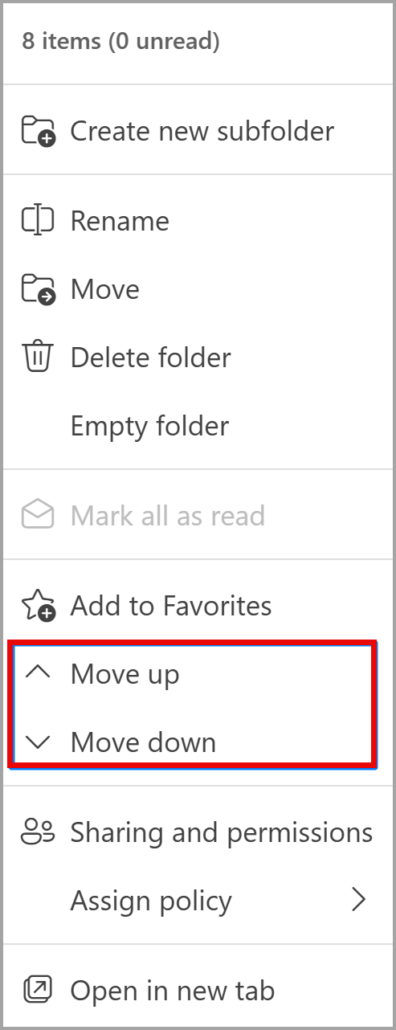
Users can hover next to each folder name to see the three-dot menu where they can move folders with drag-and-drop or the move up/move down options:
Questions? Please contact Crimson Service Desk at crimsonservicedesk@wsu.edu or 509-335-4357.