Please Note:
- Microsoft rescheduled this change to Monday, Jan. 13, 2025, from Sunday, Oct. 20, 2024.
- Microsoft announced that the new data sync is expected to be fully available for all new group forms and personal forms by the end of November 2024.
Microsoft Forms is introducing a new data sync solution to Microsoft Excel for the web, improving reliability for capturing and syncing form response data to cloud-hosted Excel workbooks. This new solution will replace the current data sync solution that exists in the following form types by Monday, Jan. 13, 2025:
- Forms created from Microsoft OneDrive and Excel for the web
- Group forms created with SharePoint Online, Microsoft Teams, and Microsoft 365 Groups
WSU users who view form responses in Excel and own forms created via the above methods must manually enable the new data sync solution by Jan. 13 to continue receiving form response data in their Excel workbooks.
To assist with transitioning to the new data sync solution, Microsoft will notify affected form owners via email, the Forms web portal, and Excel for the web.
Notifications in the Forms web portal will prompt form owners to update their online Excel workbook to continue syncing response data. Information Technology Services (ITS) recommends impacted WSU users update their forms with the following instructions:
- Visit the Forms web portal and sign in with your WSU username and password.
- Open the form that you review responses through Excel.
- Select the Responses tab.
- Select the Open in Excel option.
- Select the Update sync in Excel option when you receive the following prompt:
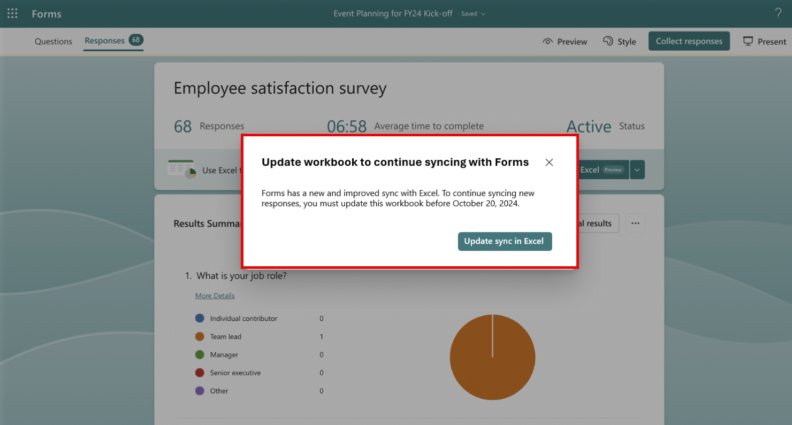
Notifications in Excel for the web will also prompt owners to update to the new data sync solution:

Once successfully updated, Microsoft will create a new worksheet with the latest forms data in the same workbook as the previous data sync:

Following Jan. 13, online Excel files configured with the older data sync will no longer automatically update with new form response data. Form owners can enable the new data sync after the older solution retires to resume response data collection for their workbook.
Please note that impacted forms owners interested in receiving new forms response data in the Excel desktop app will need to open the file in Excel for the web, enable the new sync solution, and allow the desktop app file to sync from the online file.
Contact Us
For any Microsoft Forms questions, please contact Crimson Service Desk at crimsonservicedesk@wsu.edu or 509-335-4357.