Please see the following scheduled Microsoft change:
Date: Between mid-May and late-June 2025 *
The following work is being completed: Microsoft is updating the unlicensed version of Copilot Chat. This will introduce minor changes to the look and feel for the service.
All affected groups: WSU Copilot Chat users
All affected processes: Interface and features for Copilot Chat. Expected changes are detailed below.
Duration of impact: This is a permanent, Microsoft-driven change.
Necessary follow up steps: None
* An exact implementation date for WSU’s Copilot Chat environment is unavailable.
Questions? Please contact Crimson Service Desk at crimsonservicedesk@wsu.edu or 509-335-4357.
Upcoming Web Changes
Below are changes specific to the Copilot web experience:
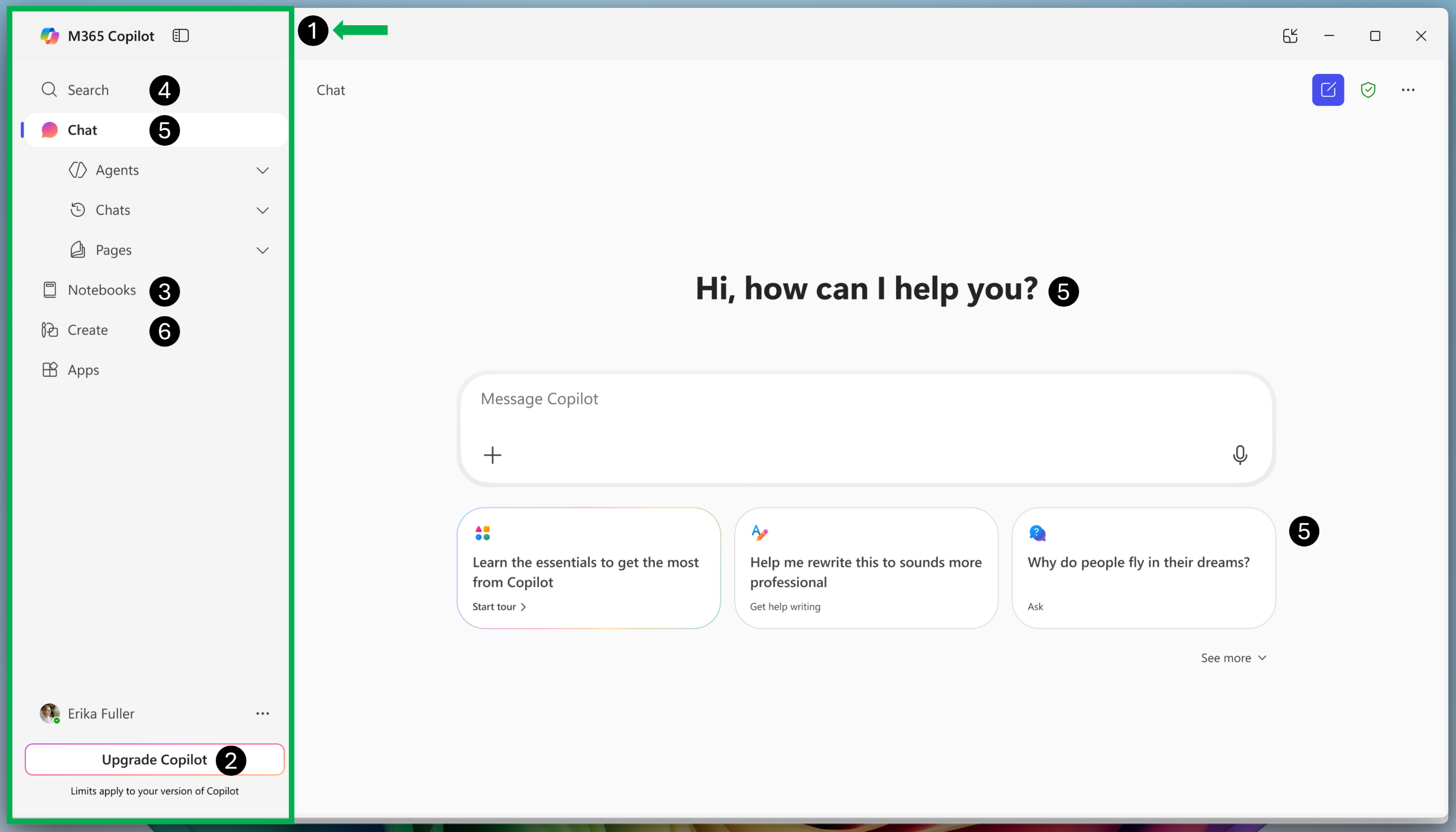
- New Navigation Pane: The left navigation pane will provide access to modules such as Search, Chat, Notebooks, Create, and Apps.
- Upgrade Copilot: This button will direct users to information for purchasing a standalone Copilot license with a personal Microsoft account.
- Reminder: WSU currently only offers no-cost access to the unlicensed web version of Copilot.
- Notebooks: This feature is not available to WSU Copilot users. This module will display a screen indicating that a paid Copilot license is required.
- Search: This module will display a search bar and key files.
- Chat: The chat input box will move to the center of the user interface. Prompt suggestions will appear below the chat input box. An updated collapsable left navigation pane will also offer access to chat history and agents.
- Create: This module will allow users to create documents, presentations, and more using templates.
Upcoming Mobile App Changes
Below are changes specific to the Copilot mobile app experience:
- Navigation pane: Search, Chat, and Create modules will pin to the bottom of the app. The new navigation menu in the top left of the app will also provide access to other modules.
- Create: The Scan, Extract, and Dictate flows from the Capture module will merge into a new Create module.